Most B2B Google Ads accounts are not underperforming because of bad strategy. They are underperforming because nobody is looking at them consistently. Campaign setup is one investment of time. Optimisation is a recurring discipline, and the gap between a campaign that generates predictable pipeline and one that quietly drains budget is almost always found in the weekly checks that did or did not happen.
This guide covers the 8 google ads optimization b2b weekly checks that keep B2B campaigns generating qualified leads at a controlled cost. Each check takes between 10 and 20 minutes. Done together, they represent roughly 90 minutes of focused account management that compounds into significantly lower CPL and higher lead quality over time. If you have never done a structured audit of your account, our guide on Google Ads audit steps to find wasted budget in B2B campaigns is the right starting point before establishing a weekly cadence.
| Key Takeaways Weekly Google Ads optimisation is what separates campaigns that compound in efficiency from those that slowly deteriorateThe Search Terms Report is the single highest-value weekly check for any B2B campaignKeyword-level CPL analysis frequently reveals that 20 percent of keywords consume 80 percent of budget with poor returnsLanding page conversion rate is often the most impactful lever in B2B campaigns and the most overlookedConversion tracking verification should happen every week because tracking breaks silently and corrupts all downstream dataThese 8 checks take approximately 90 minutes per week and typically reduce B2B CPL by 20 to 40 percent within 90 days |
Why Weekly Checks Matter More in B2B Than B2C
B2B Google Ads campaigns have lower conversion volumes, higher CPCs, and longer attribution windows than most B2C campaigns. This means each individual decision carries more weight. A single week of a broad match keyword matching irrelevant queries, or a landing page that broke on mobile, or a budget skewing toward a low-intent audience segment, can consume AED 5,000 to AED 20,000 in wasted spend before a monthly review catches it.
Weekly checks compress the feedback loop. Problems surface within days instead of weeks. Optimisation opportunities are acted on while there is still budget to redirect. For B2B campaigns with limited monthly budgets, the compounding effect of consistent weekly management is the difference between a campaign that earns its investment and one that exhausts it. This is also why our B2B Google Ads agency includes weekly optimisation as a non-negotiable component of every managed account, alongside the full audit framework covered in our Google Ads audit guide.
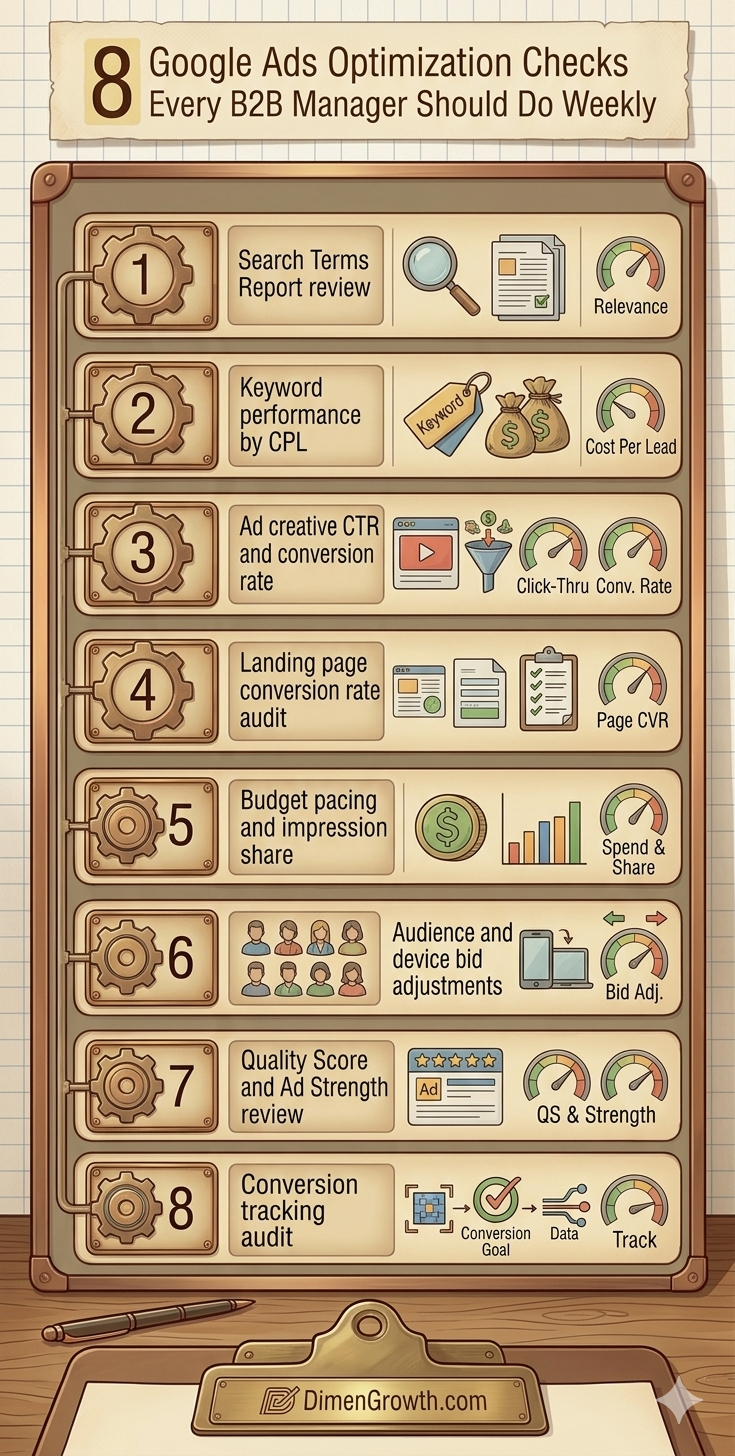
| # | Weekly Check | Time Required | Impact on B2B CPL | Priority |
| 1 | Search Terms Report review | 20 min | High | Critical |
| 2 | Keyword performance by CPL | 15 min | High | Critical |
| 3 | Ad creative CTR and conversion rate | 15 min | Medium-High | High |
| 4 | Landing page conversion rate audit | 10 min | High | High |
| 5 | Budget pacing and impression share | 10 min | Medium | High |
| 6 | Audience and device bid adjustments | 15 min | Medium | Medium |
| 7 | Quality Score and Ad Strength review | 10 min | Medium | Medium |
| 8 | Conversion tracking verification | 10 min | Critical | Critical |
The 8 Weekly Google Ads Optimisation Checks for B2B
Check 1: Search Terms Report Review
Time required: 20 minutes
What to look for: Irrelevant queries consuming budget, new keyword opportunities, match type issues
The Search Terms Report shows every actual search query that triggered your ads in the past seven days. For B2B campaigns using phrase match or broad match keywords, this report consistently reveals irrelevant queries that have slipped through: job-related searches, consumer-intent queries, informational research, and geographic terms outside your target market. Every irrelevant query on this list is money spent on someone who will never buy from you.
Your weekly action: Filter the report by cost (highest to lowest) and review the top 50 queries. Add every irrelevant term as a negative keyword to your shared negative list. Also look for high-performing queries that are not already in your keyword list and add them as exact match keywords. Our comprehensive list of 101 negative keywords for B2B Google Ads in the UAE covers the universal exclusions every B2B account needs, but your Search Terms Report provides the campaign-specific additions that no generic list can anticipate.
- Filter: Last 7 days, sorted by cost descending
- Action threshold: Add negatives for any query spending more than AED 50 with zero conversions
- Opportunity threshold: Add as exact match keyword any query with a conversion at below-target CPL
- Time saved by doing this weekly: Prevents 1 to 3 weeks of continued irrelevant spend before the next review
Check 2: Keyword Performance by CPL
Time required: 15 minutes
What to look for: Keywords spending heavily with zero or high CPL, keywords converting efficiently that deserve more budget
Pull a keyword performance report filtered to the past 14 days and sort by cost. For every keyword spending above your average CPC with zero conversions in that period, make a decision: pause it, reduce the bid, or give it more time if the spend is below a meaningful threshold. For every keyword converting at or below your target CPL, consider a bid increase to capture more of the available impression share.
The 80/20 pattern appears in almost every B2B Google Ads account with more than 20 active keywords: roughly 20 percent of keywords generate 80 percent of conversions, while the remaining 80 percent consume budget with minimal return. Weekly keyword CPL review is how you progressively shift budget from the underperforming 80 percent toward the converting 20 percent.
For B2B campaigns using Smart Bidding strategies such as Target CPA, individual keyword bids are managed by the algorithm rather than manually. In this case, focus your keyword review on impression share data rather than individual bids. Keywords with high impression share loss due to budget are conversion opportunities being left on the table. Our guide on Google Ads bidding strategies for B2B long sales cycles covers when to use manual versus automated keyword bidding in detail.
- Review period: Last 14 days (weekly reviews use a rolling 14-day window for statistical stability)
- Pause threshold: Keywords spending more than 3x target CPL with zero conversions over 14 days
- Scale threshold: Keywords converting at or below 80 percent of target CPL deserve a 15 to 20 percent bid increase
- Exception: Decision-stage keywords with high commercial intent get a longer evaluation window (21 to 28 days) due to B2B conversion lag
Check 3: Ad Creative CTR and Conversion Rate
Time required: 15 minutes
What to look for: Low CTR headlines, poor conversion rate on high-CTR ads, creative fatigue signals
Pull your ad performance report for the past 30 days and review two metrics in combination: click-through rate (CTR) and conversion rate (CVR). An ad with high CTR but low CVR is attracting clicks from people who are not buyers, which indicates a messaging or audience alignment problem. An ad with low CTR but high CVR is converting efficiently but not reaching enough people, which indicates a headline or relevance issue.
For Responsive Search Ads (RSAs), Google’s asset report shows which headline and description combinations are getting the most impressions and the highest click rates. Identify the lowest-rated assets marked as “Low” and replace them with variations that test a different angle: problem-first copy, outcome-focused copy, or proof-point copy with a specific number.
B2B ad creative fatigue sets in faster than most advertisers expect, particularly in the UAE where the professional decision-maker audience is relatively small and niche. If your top-performing ad has been running without changes for 60 days or more, it is likely experiencing diminishing returns even if the data does not yet show a dramatic drop. This applies equally to LinkedIn ad formats running alongside your Google Ads campaigns, where creative rotation is equally critical for maintaining engagement rates.
- CTR benchmark for B2B Search ads: 3 to 6 percent. Below 3 percent warrants headline review.
- CVR benchmark for B2B landing pages: 2 to 8 percent depending on offer and audience temperature
- Creative refresh trigger: Any ad running for 60 or more days without a meaningful update
- RSA asset action: Replace all “Low” rated assets with new variants testing a different copy angle
Check 4: Landing Page Conversion Rate Audit
Time required: 10 minutes
What to look for: Conversion rate drops, mobile performance issues, page speed degradation, form failures
Your landing page conversion rate is often the most impactful lever in a B2B Google Ads campaign and the one most frequently overlooked in weekly management. A landing page that converts at 8 percent versus 4 percent halves your CPL without any change to bids, budgets, or targeting. Conversely, a landing page that breaks silently, loads slowly on mobile, or has a form that stops submitting, can destroy a campaign’s performance overnight.
Check your landing page performance in Google Ads by reviewing the landing page tab in campaign reports. Look for significant week-over-week drops in conversion rate on pages that previously performed consistently. If a landing page that was converting at 6 percent drops to 2 percent in a single week, something has changed: a form broke, a page element failed to load, the mobile layout shifted, or a CTA button stopped working.
For B2B companies running Google Ads alongside LinkedIn Ads campaigns, the same landing pages are often used across both channels. A page issue identified in your Google Ads weekly check is therefore likely also affecting your LinkedIn campaign performance. Always cross-check landing page conversion rates across both channels when a drop is detected.
- Check method: Landing Pages tab in Google Ads, filtered to the past 7 days vs. prior 7 days
- Red flag: More than 20 percent week-over-week conversion rate drop on an established landing page
- Mobile check: Filter by device to compare mobile versus desktop conversion rate. If mobile is significantly lower, test the page on a mobile device immediately.
- Form verification: Submit a test form on your landing page weekly to confirm the submission is recorded correctly in both Google Ads and your CRM
Check 5: Budget Pacing and Impression Share
Time required: 10 minutes
What to look for: Budget exhaustion too early in the day, impression share lost to budget, over-delivery on low-value campaigns
Review your campaign budget pacing report to identify campaigns that are exhausting their daily budget significantly before the end of the day. For B2B campaigns targeting professional audiences who are most active during business hours (9am to 6pm in the UAE), a campaign that runs out of budget by 2pm is missing the most valuable impression window of the day.
The Search Lost Impression Share (Budget) metric tells you what percentage of eligible impressions your campaign missed due to insufficient budget. For high-performing campaigns generating qualified pipeline, a budget impression share loss above 20 percent is a signal to increase the daily budget. For campaigns with poor CPL performance, budget exhaustion early in the day may actually be protecting you from further inefficient spend, and the right fix is campaign restructuring, not budget increase.
- Check: Campaign budget pacing, Lost IS (budget) metric, time-of-day delivery distribution
- Action for high-performing campaigns: Increase daily budget if Lost IS (budget) exceeds 20 percent
- Action for low-performing campaigns: Review campaign structure and keyword quality before increasing budget
- UAE business hours consideration: Ensure ad scheduling is not limiting delivery during the 9am to 6pm peak business window
Check 6: Audience and Device Bid Adjustments
Time required: 15 minutes
What to look for: Underperforming device segments consuming disproportionate budget, audience segments with significantly different CPL
Pull your performance data segmented by device (desktop, mobile, tablet) and by audience (remarketing lists, customer match, in-market audiences). For B2B campaigns, desktop typically outperforms mobile for direct conversion because B2B buyers completing procurement research and filling out lead forms more commonly do so on desktop. If your mobile conversion rate is significantly lower than desktop, a mobile bid adjustment of negative 20 to 40 percent redirects spend toward the higher-converting device segment.
For audience segments, compare the CPL of users in your remarketing lists versus cold audiences without any audience membership. Retargeted users almost always convert at a lower CPL than cold audiences. If the data confirms this pattern, increase bids for remarketing audiences by 20 to 30 percent to capture more of the high-value warm audience traffic.
This principle of audience-based bid optimisation applies across channels. For B2B companies running LinkedIn Ads alongside Google Ads, the warm audiences built through LinkedIn engagement can be used as website visitor segments in Google Ads remarketing, creating a cross-channel warm audience pool that benefits both platforms simultaneously.
- Device check: Compare conversion rate and CPL by device. Apply negative bid adjustments to devices with CPL more than 50 percent above target.
- Audience check: Compare CPL for remarketing audiences versus cold audiences. Apply positive bid adjustments of 20 to 30 percent for warm audiences converting below target CPL.
- Tablet recommendation: Most B2B campaigns benefit from a negative 100 percent tablet bid adjustment as tablet usage generates minimal B2B conversions relative to cost
- Review period: Use 30-day data for device and audience analysis. Weekly data alone is insufficient for statistically meaningful device-level decisions.
Check 7: Quality Score and Ad Strength Review
Time required: 10 minutes
What to look for: Keywords with Quality Score below 5, RSAs rated Poor or Average, landing page experience rated Below Average
Quality Score is Google’s assessment of the relevance and quality of your keywords, ads, and landing pages on a scale of 1 to 10. A low Quality Score directly increases your CPC because Google charges lower-quality advertisers more per click than higher-quality advertisers competing for the same impression. For B2B campaigns with high CPCs, a Quality Score improvement from 4 to 7 on a core keyword can reduce CPC by 30 to 50 percent without any bid change.
The three components of Quality Score are Expected Click-Through Rate, Ad Relevance, and Landing Page Experience. Review each component separately for keywords with a score below 6. Expected CTR issues indicate headline problems. Ad Relevance issues indicate that your ad copy does not closely enough match the keyword’s search intent. Landing Page Experience issues indicate that your landing page content does not sufficiently match what the searcher expects to find after clicking.
For B2B companies also running SEO for B2B alongside Google Ads, Quality Score improvements often align with SEO improvements: more relevant page content, faster page load speed, and better mobile experience benefit both organic ranking and paid Quality Score simultaneously, creating a compounding return from the same content and technical investments.
- Action for Quality Score below 5: Review each component separately and address the lowest-rated element first
- Action for Landing Page Experience Below Average: Improve keyword-to-page relevance by matching the page headline to the search query, improving page load speed, and ensuring the primary CTA is visible above the fold
- RSA Ad Strength: Any RSA rated Poor should be updated immediately with additional headline and description variants
- Weekly time investment: This check takes 10 minutes but its impact compounds over months as Quality Scores improve and CPCs decrease
Check 8: Conversion Tracking Verification
Time required: 10 minutes
What to look for: Conversion actions showing zero conversions unexpectedly, tracking status errors, conversion count anomalies
Conversion tracking breaks silently and without warning. A website update changes a URL, a form submission confirmation page moves, a tag fires on the wrong event, or a third-party integration loses its authentication. When conversion tracking breaks, Google Ads continues spending your budget, but the algorithm receives zero conversion signals. Smart Bidding strategies begin optimising toward cheaper, lower-quality clicks because they have no quality signal to differentiate. CPL appears to drop (because fewer conversions are recorded) while actual lead quality deteriorates.
Every week, verify that your conversion actions are recording conversions as expected. Check that the conversion count for the past 7 days is consistent with the prior week’s volume adjusted for any budget or traffic changes. Check the conversion action status column in your Google Ads account for any tags showing as Inactive, No Recent Conversions, or Tag Not Verified. Submit a test conversion on your live website to confirm the tracking fires correctly.
Conversion tracking accuracy is also the foundation of every bidding strategy decision. Our guide on Google Ads bidding strategies for B2B long sales cycles explains how Smart Bidding depends entirely on clean conversion data. Broken tracking and Smart Bidding is one of the most expensive combinations in B2B paid search. The weekly verification check prevents this scenario from developing.
- Check method: Conversion actions tab in Google Ads, filter by Last 7 Days, review conversion count and tag status
- Red flag: Any conversion action showing zero conversions in the past 7 days that should be recording based on traffic volume
- Verification method: Use Google Tag Assistant or submit a test form on your live website and confirm the conversion fires in Google Ads real-time reporting
- CRM cross-check: Monthly, compare CRM lead count from Google Ads attribution against Google Ads conversion count. Significant discrepancies indicate tracking or attribution issues.
The 90-Minute Weekly B2B Google Ads Optimisation Schedule
Run these 8 checks in sequence every Monday morning before taking any other campaign actions. The order matters: start with the checks that identify wasted spend (Checks 1 and 2), move to performance quality (Checks 3 and 4), then cover delivery and efficiency (Checks 5 and 6), and finish with account health (Checks 7 and 8).
- Monday 9:00 to 9:20: Search Terms Report review and negative keyword additions (Check 1)
- Monday 9:20 to 9:35: Keyword CPL analysis and bid adjustments (Check 2)
- Monday 9:35 to 9:50: Ad creative CTR and CVR review (Check 3)
- Monday 9:50 to 10:00: Landing page conversion rate audit (Check 4)
- Monday 10:00 to 10:10: Budget pacing and impression share (Check 5)
- Monday 10:10 to 10:25: Audience and device bid adjustments (Check 6)
- Monday 10:25 to 10:35: Quality Score and Ad Strength review (Check 7)
- Monday 10:35 to 10:45: Conversion tracking verification (Check 8)
Document the outputs of each check in a shared weekly log: keywords paused, negatives added, bids adjusted, creative updated. After 90 days, this log becomes a record of every optimisation action taken and its impact on CPL, making it easy to identify which optimisation types deliver the most consistent improvement for your specific account. For a deeper structural review of your account, our Google Ads audit guide for B2B campaigns covers the full diagnostic process beyond weekly maintenance.
Frequently Asked Questions
How often should a B2B Google Ads account be optimised?
Weekly optimisation is the minimum effective cadence for B2B Google Ads accounts generating meaningful spend. The 8 checks in this guide take approximately 90 minutes per week and address the most common causes of CPL deterioration. For high-spend accounts above AED 30,000 per month, bi-weekly or even daily monitoring of the Search Terms Report and conversion tracking status is advisable given the financial impact of delayed responses to issues.
What is the most important Google Ads optimisation check for B2B campaigns?
The Search Terms Report review consistently delivers the highest return per minute of optimisation time for B2B campaigns. Every week this report is not reviewed, irrelevant queries consume budget that could have been redirected toward commercial-intent traffic. Paired with a comprehensive negative keyword list, weekly Search Terms Report review is the single most impactful recurring action a B2B Google Ads manager can take. See our 101 negative keywords for B2B Google Ads in the UAE for the complete foundational exclusion list.
Can I automate these Google Ads weekly checks?
Partially. Google Ads automated rules and scripts can flag anomalies such as CTR drops, budget exhaustion, and conversion count changes. Google’s recommendations panel also surfaces some optimisation opportunities automatically. However, the judgment-based decisions, such as which new negative keywords to add, which ad angles to test, and whether a landing page conversion drop indicates a tracking issue or a genuine performance change, require human review. Automation is a supplement to weekly checks, not a replacement.
How do I know if my Google Ads optimisation is working?
Track three metrics on a weekly basis: CPL trend (should decrease or stabilise), conversion volume trend (should increase with the same or lower budget), and lead quality trend (measured through CRM data, not Google Ads conversion count alone). If weekly optimisation is working, you should see CPL improvement of 5 to 15 percent per month for the first 3 to 6 months before reaching an efficiency plateau. Improvements beyond that point typically require structural changes or expanded keyword strategy.
What tools do I need for weekly Google Ads optimisation?
The core checks in this guide require only Google Ads Campaign Manager, Google Analytics, and your CRM. Google Tag Assistant (browser extension) is useful for conversion tracking verification. Google Ads Editor (desktop application) speeds up bulk negative keyword additions. For accounts with complex campaign structures or multiple campaigns, Looker Studio dashboards connected to Google Ads data can reduce the time needed for weekly performance review by presenting key metrics in a single view rather than requiring navigation across multiple reports.
Build a Weekly Rhythm That Compounds Into Long-Term Results
The google ads optimization b2b weekly discipline is not glamorous. There is no single check that produces a dramatic overnight improvement. What it produces is a campaign that deteriorates more slowly than every competitor’s and improves more consistently than every account that is only reviewed monthly. Over 6 to 12 months, the compounding effect of weekly negative keyword expansion, bid optimisation, creative refresh, and tracking verification is the most reliable path to sustainable CPL reduction in B2B paid search. For B2B companies running multiple paid channels, see our guides on LinkedIn ad ideas that fill B2B pipelines and LinkedIn thought leader ad strategies for B2B brands to apply the same optimisation rigour across your full paid media programme.
If you want these 8 checks handled by an expert team every week without consuming your internal capacity, our B2B Google Ads agency and Google Ads team in Dubai manage accounts for B2B companies focused on pipeline, not just traffic.
Ready to stop guessing and start optimising? Book a free Google Ads account review with our team.
Related reading: 10 Google Ads Mistakes That Kill B2B Campaigns | 101 Negative Keywords for B2B Google Ads UAE | Google Ads Bidding Strategies for B2B
Sources: Google Ads Help Centre | Think With Google