The average B2B Google Ads account wastes between 20 and 40 percent of its budget on traffic that will never generate a qualified lead. This is not a pessimistic estimate. It is the consistent finding when an experienced practitioner reviews an account that has been running without a structured audit process. Irrelevant search queries, broken conversion tracking, misaligned landing pages, and incorrect bidding configurations each contribute to a budget leak that compounds silently over months.
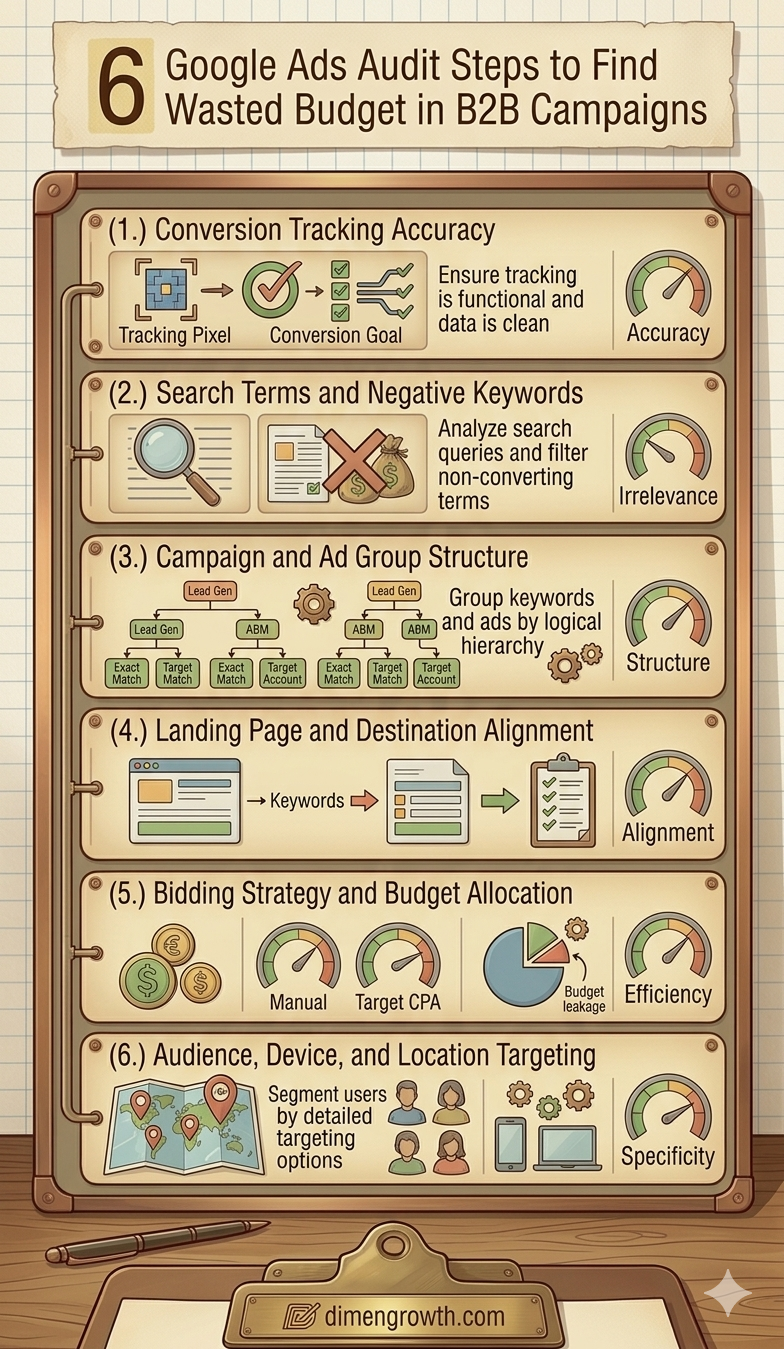
A google ads audit b2b is not a one-time fix. It is a diagnostic process that surfaces where budget is being wasted, why it is happening, and what structural changes will stop the leak. This guide covers the 6 audit steps that consistently find the most wasted spend in B2B Google Ads accounts, in order of financial impact. Each step includes what to look for, what the common findings reveal, and what action to take. For day-to-day maintenance after completing this audit, our guide on 8 Google Ads optimisation checks every B2B manager should do weekly covers the recurring process that keeps an audited account performing.
| Key Takeaways Most B2B Google Ads accounts waste 20 to 40 percent of budget on fixable structural issuesBroken conversion tracking is the most dangerous waste category because it corrupts all optimisation decisions downstreamSearch Terms and negative keyword gaps are the most common and most immediately fixable source of wasted spendCampaign structure issues including over-fragmentation and misaligned ad groups are consistently underestimated in their budget impactLanding page and destination misalignment is often the largest CPL lever that is not a bidding or keyword decisionA full B2B Google Ads audit typically takes 3 to 4 hours and identifies enough optimisation opportunities to reduce CPL by 25 to 50 percent |
Before You Start: What a B2B Google Ads Audit Is Not
A Google Ads audit is not a review of whether your ads look good or whether your copy is persuasive. It is a structural diagnostic. It asks: is the account configured to find buyers, spend budget efficiently, measure outcomes accurately, and optimise toward the right signals? Most B2B accounts that underperform do so for structural reasons, not creative reasons.
Run this audit on a fresh account before launching, on an existing account that has been running for 90 or more days without improvement, or on an account inherited from a previous team or agency. The 6 steps below are ordered by financial impact, starting with the issue that can waste the most money. For context on the most common structural errors that make audits necessary in the first place, see our guide on 10 Google Ads mistakes that kill B2B campaigns.
| Step | Audit Area | Avg. Wasted Spend Found | Time to Audit | Priority |
| 1 | Conversion tracking accuracy | Up to 100% (if broken) | 30 min | Critical |
| 2 | Search Terms and negative keywords | 15 to 35% | 45 min | Critical |
| 3 | Campaign and ad group structure | 10 to 25% | 60 min | High |
| 4 | Landing page and destination alignment | 10 to 30% | 30 min | High |
| 5 | Bidding strategy and budget allocation | 5 to 20% | 30 min | High |
| 6 | Audience, device, and location targeting | 5 to 15% | 30 min | Medium |
The 6 Google Ads Audit Steps for B2B Campaigns
Step 1: Audit Conversion Tracking Accuracy
Why it comes first: Every other optimisation decision in a Google Ads account depends on conversion data. If tracking is broken or inaccurate, you are either optimising toward nothing or optimising toward the wrong signal.
Begin the audit by verifying that every conversion action in the account is recording correctly and that the conversion events being tracked represent actual business value. Open the Conversions section in Google Ads Tools and check the status of each conversion action: Active means the tag has fired recently, No Recent Conversions means the tag has not fired in the past 30 days, and Inactive means the tag is not configured or installed correctly.
For each active conversion action, verify that it is tracking the right event. Form submission confirmation page views are the correct trigger for lead capture forms. Phone call conversions should have a minimum call duration threshold of 30 seconds to exclude wrong numbers and auto-dialers. Chat interactions should only count as conversions when a meaningful engagement threshold is met, not simply when the chat widget is opened.
Then cross-check: take your Google Ads conversion count for the past 30 days and compare it against your CRM lead count from Google Ads sources for the same period. A significant discrepancy in either direction indicates a tracking problem. More Google Ads conversions than CRM leads suggests double-counting or tracking irrelevant events. Fewer Google Ads conversions than CRM leads suggests tracking gaps or attribution mismatches.
For B2B companies with long sales cycles, also audit the conversion window settings. If your average sales cycle is 90 days but your conversion window is set to 30 days, you are under-counting Google Ads’ contribution to pipeline and your Smart Bidding algorithms are optimising on incomplete data. Our guide on Google Ads bidding strategies for B2B long sales cycles covers how conversion windows affect bidding strategy performance in detail.
- Audit output: List of every conversion action with status, event trigger, and 30-day count
- Red flags: Inactive tags, zero conversions on high-traffic pages, conversion counts that do not match CRM data
- Fix priority: Conversion tracking issues must be resolved before any other optimisation work has meaning
- Time required: 30 minutes for most accounts; longer for accounts with complex tagging implementations
Step 2: Audit Search Terms and Negative Keyword Coverage
Why it ranks second: Search terms represent the actual queries triggering your ads. Negative keyword gaps are the most common and most immediately fixable source of wasted spend in B2B campaigns.
Pull your Search Terms Report for the past 90 days and export it to a spreadsheet. Sort by cost descending. Work through the top 100 queries by spend and categorise each as: commercial intent (relevant buyer query), informational intent (research query with no purchase intent), navigational intent (looking for a specific brand or website), or irrelevant intent (job seeker, student, consumer, unrelated industry).
For most B2B accounts that have never undergone a structured negative keyword audit, 25 to 40 percent of the top queries by spend fall into the irrelevant or informational categories. Calculating the spend on these queries gives you the immediate wasted budget figure for this audit step. Every irrelevant query in your Search Terms history that has not yet been added as a negative keyword is waste that continues accumulating.
Add every irrelevant query to your shared negative keyword list immediately. Then cross-reference your current negative keyword list against our 101 negative keywords for B2B Google Ads in the UAE to identify universal exclusions that may be missing from your account. For UAE-based campaigns, the UAE-specific negative category covering visa terms, PRO services, and company formation queries is particularly important and frequently absent from accounts that have not been locally audited.
- Audit period: 90 days minimum for comprehensive search term coverage
- Categorisation: Commercial, informational, navigational, irrelevant
- Wasted spend calculation: Sum of cost for all irrelevant and informational queries
- Action: Add all irrelevant queries as phrase match negatives to the shared account-level list
Step 3: Audit Campaign and Ad Group Structure
Why it matters: Campaign and ad group structure determines how well Google can match your ads to the right queries, how efficiently Smart Bidding can learn from your conversion data, and how easy the account is to manage and optimise over time.
A well-structured B2B Google Ads account groups keywords by intent stage and theme, with each ad group containing three to eight closely related keywords and at least two active Responsive Search Ads. Poorly structured accounts have one of two common problems: over-fragmentation (hundreds of ad groups with one or two keywords each, preventing data concentration for Smart Bidding) or under-segmentation (all keywords in a single campaign or ad group, preventing intent-specific bidding and messaging).
During this audit step, review the number of ad groups, the keyword count per ad group, the conversion volume per ad group over 90 days, and the ad count per ad group. Ad groups with fewer than five conversions over 90 days cannot support Smart Bidding independently and should either be merged with similar ad groups or managed under Manual CPC. Ad groups with zero active RSAs should have at least one added immediately, as Google deprioritises ad delivery to ad groups without RSAs.
Also audit campaign-level settings for each campaign: location targeting (are you targeting the right geographic area?), language targeting (are you targeting the right languages for your UAE audience?), and ad scheduling (are you showing ads during the hours when B2B buyers are active?). For B2B campaigns in Dubai targeting both English and Arabic-speaking decision-makers, separate campaigns for each language with language-matched ad creative consistently outperform single campaigns targeting both languages simultaneously. This segmentation principle applies equally to LinkedIn targeting strategies for UAE decision-makers, where Arabic and English audience separation is equally important.
- Structure audit checklist: Ad groups per campaign (ideal: 5 to 20), keywords per ad group (ideal: 3 to 8), RSAs per ad group (minimum: 1, ideal: 2 to 3), conversions per ad group over 90 days (minimum: 5 for Smart Bidding)
- Over-fragmentation fix: Merge ad groups with similar keyword themes and below-threshold conversion volumes
- Under-segmentation fix: Split campaigns by intent stage, product line, and audience segment to enable distinct bidding and messaging per segment
- Language fix: Create separate campaigns for English and Arabic audiences with language-matched ad copy
Step 4: Audit Landing Page and Destination Alignment
Why it matters: Your ad can be perfectly targeted and your keyword list spotless, but if the click lands on a page that does not match the search intent, the conversion opportunity is lost. Landing page issues are often the largest untapped CPL improvement lever in B2B campaigns.
For every active campaign, check the final URL destination. Confirm that each ad group’s landing page directly addresses the search intent of the keywords in that group. A campaign targeting “marketing automation for SaaS companies” should land on a page specifically about marketing automation for SaaS, not on a generic marketing software homepage. The page headline should echo or closely paraphrase the keyword that triggered the ad.
Check mobile performance specifically. In the UAE, more than 60 percent of Google searches happen on mobile devices. A landing page that converts at 8 percent on desktop but 2 percent on mobile is losing the majority of its traffic before the user reaches the CTA. Test every campaign’s landing page on a mobile device manually during the audit and record load time, CTA visibility above the fold, and form functionality.
Also check for destination URL errors. Broken destination URLs, pages that return 404 errors, and pages that redirect incorrectly are campaign-level budget drains that are easy to miss in routine management. Every click to a broken destination is a paid click that cannot convert under any circumstances. For B2B companies also running LinkedIn ad campaigns, the same landing page audit applies. A broken or misaligned landing page wastes LinkedIn CPCs and Google CPCs simultaneously.
- URL check: Test every unique destination URL in the account for 404 errors, redirect chains, and page load errors
- Intent alignment check: Does the landing page headline and primary content directly address the search intent of the ad group’s keywords?
- Mobile conversion check: Filter Google Ads data by device. If mobile conversion rate is less than 50 percent of desktop rate, the mobile landing page experience requires urgent improvement.
- Page speed check: Use Google PageSpeed Insights to test each landing page. Pages scoring below 70 on mobile have demonstrably lower conversion rates than faster-loading alternatives.
Step 5: Audit Bidding Strategy and Budget Allocation
Why it matters: The wrong bidding strategy for a campaign’s data maturity stage produces systematically inefficient spend that no amount of keyword or creative optimisation can overcome.
For each campaign, record the current bidding strategy and the monthly conversion volume for the past 90 days. Cross-reference this against the minimum conversion thresholds each strategy requires to function effectively. Target CPA requires 30 or more conversions per month per campaign. Target ROAS requires 50 or more. Campaigns running Smart Bidding below these thresholds are optimising on insufficient data, which typically produces erratic CPL performance.
Also audit budget allocation across campaigns relative to their pipeline contribution. A common finding in B2B accounts is that high-budget campaigns with poor CPL performance are receiving more than their share of total spend, while low-budget campaigns with excellent CPL performance are constrained below their potential reach by insufficient daily budget. Rebalancing budget toward the highest-efficiency campaigns is often the single fastest way to improve overall account performance without increasing total spend.
Review the impression share metrics for your best-performing campaigns. A campaign with an excellent CPL that is losing 30 to 40 percent of eligible impressions due to budget constraints is your highest-priority budget reallocation opportunity. For a full breakdown of how to match bidding strategy to campaign data maturity in B2B contexts, see our guide on Google Ads bidding strategies that work for B2B long sales cycles.
- Bidding strategy audit: Record current strategy and 90-day conversion volume for each campaign. Flag any Smart Bidding campaign below the minimum conversion threshold.
- Budget allocation audit: Calculate CPL per campaign and compare against account-level average. Identify over-funded underperformers and under-funded over-performers.
- Fix for Smart Bidding below threshold: Switch to Manual CPC or Enhanced CPC until conversion volume reaches the minimum threshold
- Budget rebalocation action: Shift budget from campaigns with CPL above 150 percent of target to campaigns with CPL below target and available impression share
Step 6: Audit Audience, Device, and Location Targeting
Why it matters: Targeting settings determine who sees your ads. Misconfigured audience, device, or location targeting means you are paying for impressions from people who will never be your customers.
Pull 90-day performance data segmented by device, location, and audience. For each dimension, identify segments that are consuming significant budget with CPL above your target threshold. Tablet devices are the most common finding: B2B campaigns typically see minimal conversions from tablet traffic while paying full CPC rates. A negative 100 percent bid adjustment for tablets is appropriate for most B2B campaigns and costs nothing except a few minutes to implement.
For location targeting, review the performance breakdown by city or region within your target geography. In the UAE, Dubai and Abu Dhabi typically generate very different CPL profiles depending on industry and solution category. If one emirate is significantly underperforming in CPL terms, a location-level bid adjustment or campaign separation may be justified.
For audience targeting, review the performance of any remarketing lists, customer match audiences, or in-market audiences applied to the account. If these audiences are present but not receiving bid adjustments relative to cold traffic, you are missing a significant CPL optimisation opportunity. Warm audiences consistently convert at lower CPL than cold audiences in B2B. Positive bid adjustments of 20 to 40 percent for remarketing and customer match audiences typically improve overall account efficiency. For context on how audience-based targeting optimisation applies across both Google and LinkedIn, see our guide on LinkedIn targeting strategies to reach C-suite decision makers in the UAE.
- Device audit: Check CPL by device. Apply negative bid adjustments to devices with CPL more than 50 percent above target. Apply negative 100 percent to tablets unless they show meaningful conversion volume.
- Location audit: Check CPL by city or region within your target geography. Apply negative bid adjustments or exclude locations with consistently poor CPL performance.
- Audience audit: Check CPL for remarketing audiences versus cold traffic. Apply positive bid adjustments of 20 to 40 percent for audiences converting below target CPL.
- Location targeting mode: Confirm campaigns are set to target users physically located in the target region, not users who have shown interest in the region. This is a common misconfiguration for UAE B2B campaigns.
What to Do After Completing the Audit
Prioritise by Financial Impact
Not every audit finding deserves equal urgency. Prioritise fixes in the order of financial impact. Broken conversion tracking is always first: no other fix has meaning until the measurement foundation is accurate. Search term and negative keyword gaps are second: these produce immediate budget recovery. Campaign structure, landing page, bidding strategy, and targeting issues follow in the order of their quantified budget impact for your specific account.
Create an Audit Action Log
Document every finding with the estimated wasted spend, the specific action required, the person responsible, and the expected completion date. This log serves two purposes: it keeps the post-audit improvement process accountable, and it creates a before-and-after record that allows you to measure the financial impact of each fix. After implementing all audit findings, run a comparison of CPL and conversion volume between the 90 days before the audit and the 90 days after. Most B2B accounts see a 20 to 40 percent CPL reduction within 60 to 90 days of a comprehensive structural audit. For maintaining the improvements after the audit, our guide on 8 weekly Google Ads optimisation checks for B2B managers provides the recurring maintenance process.
Schedule a Follow-Up Audit
A Google Ads audit is not a permanent fix. Campaign performance evolves, match types broaden over time, new irrelevant queries emerge, and platform changes introduce new configuration requirements. Schedule a full structural audit every six months and use the weekly optimisation checks to maintain performance between audits.
Frequently Asked Questions
How long does a B2B Google Ads audit take?
A thorough B2B Google Ads audit covering all 6 steps in this guide takes 3 to 4 hours for a single-account business and 6 to 8 hours for accounts with multiple campaigns and complex campaign structures. The most time-intensive step is usually the Search Terms analysis (Step 2), which requires careful manual categorisation of query intent rather than automated processing. The conversion tracking verification (Step 1) is often the fastest step but the most critical to complete accurately.
How much wasted spend does a typical B2B Google Ads audit find?
Most B2B Google Ads accounts that have not undergone a structured audit in the past 12 months have between 20 and 40 percent of total spend going to waste from fixable issues. The breakdown typically looks like this: 10 to 20 percent from irrelevant search terms and missing negatives, 5 to 15 percent from landing page conversion losses, 5 to 10 percent from bidding strategy misconfiguration, and 5 to 10 percent from audience and device targeting inefficiencies. Total wasted spend varies widely by account history and management quality.
Should I run a Google Ads audit myself or hire an agency?
If you have direct access to the account and familiarity with Google Ads reports, the 6 steps in this guide can be completed internally. The primary advantage of an external audit is perspective: an experienced practitioner reviewing an account from outside the team often identifies structural issues that internal managers have normalised or overlooked. Our B2B Google Ads agency conducts free initial audits for B2B companies in the UAE, and our Google Ads team in Dubai has audited accounts across every major B2B industry vertical in the region.
How often should a B2B Google Ads account be audited?
A full structural audit should be conducted every six months at minimum. Major platform changes (new campaign types, match type updates, Smart Bidding algorithm updates) warrant a structural review even if the six-month cadence has not been reached. Weekly optimisation checks between full audits maintain performance and catch emerging issues before they accumulate into the level of waste a full audit is designed to find.
What is the most common finding in a B2B Google Ads audit?
Missing or inadequate negative keyword coverage is the most common finding in B2B Google Ads audits, present in the majority of accounts reviewed. It is also the most immediately fixable: the fixes require no budget change, no landing page development, and no creative production. See our complete list of 101 negative keywords for B2B Google Ads in the UAE for the universal exclusions every B2B account should have in place before adding any campaign-specific negatives from the Search Terms Report.
Run the Audit, Find the Waste, Reclaim the Budget
A google ads audit b2b that follows the 6 steps in this guide will find wasted spend in virtually every B2B account. The findings are almost always structural, not strategic, which means they are fixable without increasing budget, rebuilding campaigns from scratch, or changing your targeting approach fundamentally. The budget you recover from an audit is budget that can be redirected toward the keywords, audiences, and campaigns that are already generating pipeline. For B2B companies running Google Ads alongside LinkedIn Ads or Meta Ads, the same audit discipline applied across all paid channels multiplies the efficiency gains across your entire paid media investment.
If you want an experienced team to run this audit on your account and implement the findings, our B2B Google Ads agency provides full account audits and restructuring for B2B companies across the UAE. Our Google Ads agency in Dubai has identified and recovered wasted spend for B2B companies across financial services, technology, professional services, and industrial sectors.
Ready to find out where your Google Ads budget is going? Book a free B2B Google Ads audit with our team.
Related reading: 10 Google Ads Mistakes That Kill B2B Campaigns | 101 Negative Keywords for B2B Google Ads UAE | Google Ads Bidding Strategies for B2B
Sources: Google Ads Help Centre | Think With Google